PDXpert PLM Software
Simple, flexible product lifecycle management software for growing companies™
PDXpert PLM software product literature
Download these materials to learn more about PDXpert PLM software.
| File | Format | Description |
|---|---|---|
| Product Brochure |  Adobe PDF Adobe PDF |
Describes the benefits of product lifecycle management and how PDXpert PLM software delivers these benefits. Summarizes the product features, evaluation, purchasing, training and support that are available to you. |
| Value of PLM Software |  PowerPoint PPS (ZIP)
 |
How does PLM software increase your revenue and reduce your costs? This PowerPoint presentation introduces the benefits of product lifecycle management. |
| Help File |  Compressed ZIP Compressed ZIP |
PDXpert PLM software application's most recent Windows help file (.chm) as downloadable ZIP file. See note below. |
| Help Guide | Adobe PDF |
PDXpert PLM software application's help file as an Adobe Reader file. |
The PDXpert Installation Guide and PDXpert PLM software help are available as on-line resources.
Note: PDXpert help .CHM and the Open File dialog
After you download the Windows ZIP file from this page, uncompress it using Windows Explorer. Then drag the .CHM to your computer Desktop or (if you're updating an existing installation) the PDXpert program files folder.
Windows may display a security warning dialog before allowing you to extract the help file, or before displaying the help file's contents.
Recent versions of Windows may have an additional protection hurdle. If you see the message Navigation to the webpage was canceled, then close the HTML Help viewer window and:
Select the CHM file, right-click to open the context menu, and then select Properties from the menu.
On the Properties window's General tab, click on the Unblock button.
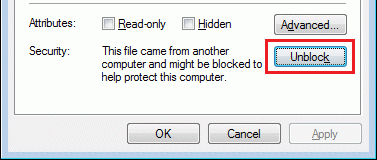
Click the OK button.
You will not see these windows if the help file has been installed as part of normal program setup.