
PDXpert PLM Software
Install Guide
PDXpert Application Server diagnostics
Last reviewed on 2023-08-02
Installation and operation errors are often related to communication problems between the PDXpert Application Server and the Microsoft SQL Server database engine.
If the SQL Server database instance is valid and running, the database server release is shown in the SQL Server text box, such asSQL Server 2019 Standard Edition (64-bit) (15.0.2070.41). If the connection is invalid or SQL Server is not running, this text box will be empty. Refer to the SQL Server diagnostics help topic.
For PDXpert 7.0 and higher: The PDXpert Application Server is a service that can be stopped and started from the Windows Control Panel, in the Services console.
Open the computer Services panel to search the Windows Start menu
On Windows 8, 10, 11 and Server 2012 (and higher): Computer Management ➔ Services & Applications ➔ Services
On Windows 7 and Server 2008: Control Panel ➔ Administrative Tools ➔ Services
Find and select PDXpert Server in the list. If the Status is not shown as Running (that is, the column is empty), then select it and click theStart the service link.
For releases prior to PDXpert 7.0: The PDXpert Application Server can be opened by selecting it from the PDXpert folder in the Start menu. When the application is running, theStart button is disabled, and the Stopbutton is enabled. Conversely, the application is stopped when the Start button is enabled. Click on the Start button to start the PDXpert Server service.
Windows and SQL Server services must be ready when the PDXpert Server service starts. On machines with complex configurations, high-priority downloads (antivirus definitions, system/user profiles), or new Windows Updates, the PDXpert Server service may start and timeout before Windows or SQL Server is ready.
Change the PDXpert Server service to useStartup Type: Automatic (Delayed Start) option. Windows delays starting the PDXpert service by 2 minutes (120 seconds).
The SQL Server instance (often named PDXPERT) should have itsStartup type: set as Automatic to start with or before the PDXpert service starts. Lower-priority services can also be set as Startup type:Automatic (Delayed Start) to give SQL Server faster start-up.
If the SQL Server service must also be delayed, then use a Windows scheduled task to start the PDXpert Server service. Set the PDXpert Server service's Startup type: as Manual and run the task at Windows start up with a selected time delay. For more information, search the web for Windows Task Scheduler
Delaying the PDXpert Server service startup also delays when users can log into the PDXpert client.
To set the PDXpert Server service to useStartup Type: Automatic (Delayed Start) option:
Open the computer Services panel to search the Windows Start menu
On recent Windows and Windows Server: Computer Management ➔ Services & Applications ➔ Services
On Windows 7 and Server 2008: Control Panel ➔ Administrative Tools ➔ Services
Find and select PDXpert Server in the list. Right-click to open the context menu, and select the Properties command.
Do not make any changes to the PDXpert Filter Service default settings.
In the PDXpert Server Properties window, set the Startup type: as Automatic (Delayed Start). Click theOK button to save the setting.
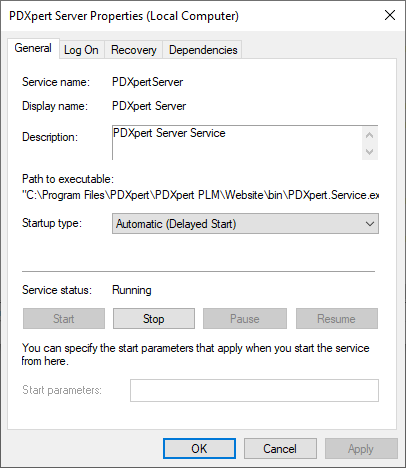
The default 120-second delay value can be changed in the registry (try settings from 180 to 360 seconds):
Open the Registry Editor tool, and go to the Computer\HKEY_LOCAL_MACHINE\SYSTEM\CurrentControlSet\Services\PDXpertServerlocation.
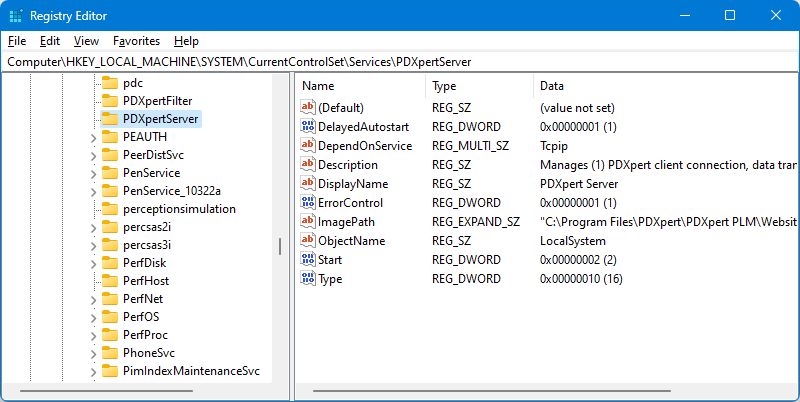
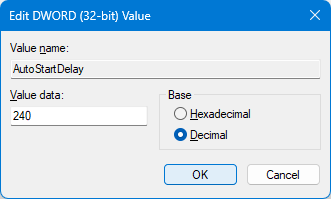
Add a new AutoStartDelay key (REG_DWORD).
Set the Base value as Decimal and then theValue data: in seconds.
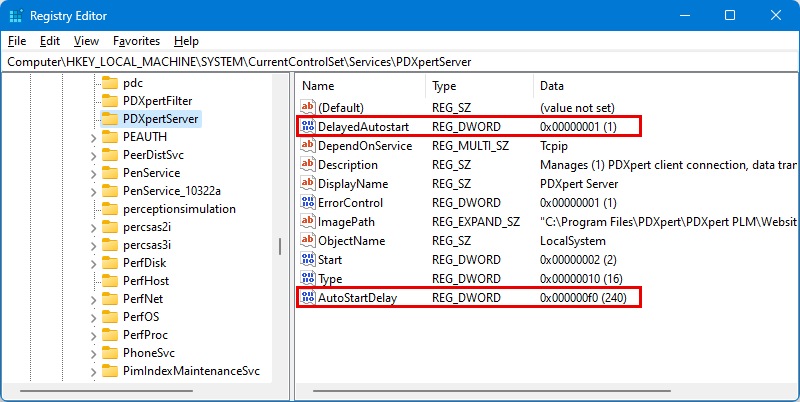
The PDXpertServer service settings now have your auto-start delay values:
The PDXpert system uses two Windows services: the PDXpert Server service, and the PDXpert Filter service. The Server service starts and stops the Filter service as needed; when you stop the Server service, it will try to stop the Filter service. The computer Services panel can be used to start and stop the PDXpert Server service, and both services are stopped automatically during an application upgrade.
In some cases, a service may fail to respond to the Stop command. You may see an error like Windows could not stop the PDXpertServer service on Local Computer. Error 1053: The service did not respond in a timely fashion. or Windows could not stop the Service on Local Computer. The service cannot accept control messages at this time.
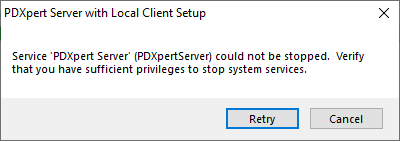
Or, during an upgrade, the error may be Service 'PDXpert Server' (PDXpertServer) could not be stopped.
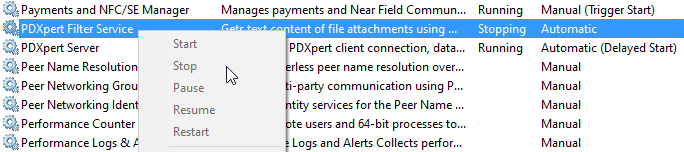
The stuck service's properties show a Stopping status that never actually stops, and no service commands are enabled. (Less frequently, the service may be stuck in the Starting status.)
This problem sometimes may be cleared by ensuring there are no pending system updates, and then restarting Windows.
If the problem repeats, you can force the service to stop (or start):
Open the Control Panel's Services app (search for Services), or open the Task Manager and go to the Services tab.
Identify which service is stuck (shown with Stopping status).
In the Windows Start menu, open a command prompt (cmd) usingRun as administrator option.
In the command window, find the PID number for the stuck service. If the PDXpertFilter service is stuck, use sc queryex PDXpertFilter
C:\WINDOWS\system32>sc queryex PDXpertFilter
SERVICE_NAME: PDXpertFilter
TYPE : 10 WIN32_OWN_PROCESS
STATE : 3 SERVICE_STOP_PENDING
WIN32_EXIT_CODE : 0 (0x0)
SERVICE_EXIT_CODE : 0 (0x0)
CHECKPOINT : 0x0
WAIT_HINT : 0x0
PID : 2291 [example only, your PID may be different]
FLAGS :or, if the PDXpertServer service is stuck, sc queryex PDXpertServer
C:\WINDOWS\system32>sc queryex PDXpertServer
SERVICE_NAME: PDXpertServer
TYPE : 10 WIN32_OWN_PROCESS
STATE : 3 SERVICE_STOP_PENDING
WIN32_EXIT_CODE : 0 (0x0)
SERVICE_EXIT_CODE : 0 (0x0)
CHECKPOINT : 0x0
WAIT_HINT : 0x0
PID : 2291 [example only, your PID may be different]
FLAGS :Use the PID number to kill the task: taskkill /F /PID 2291
C:\WINDOWS\system32>taskkill /F /PID 2291
SUCCESS: The process with PID 2291 has been terminated.
After fixing the stuck service, you can run the upgrade installer or stop/start other services as needed.
When exporting data or running a report, SQL Server often needs a temporary file in the server machine's%TEMP% folder, such as tmp475B.tmp. If Windows doesn't periodically clear the %TEMP% folder files, then after 65,535 temporary files, the folder contains every possible filename, and none are available for the export file.
Clear the %TEMP% (for example, C:\Windows\Temp) folder on the server.
After Windows has an unexpected shutdown (crash), the PDXpert Server may fail to start while showing this message:
System.Data.SqlClient.SqlException (0x80131904): The target principal name is incorrect. Cannot generate SSPI context.
The PDXpert Server service uses Windows Authentication to connect to SQL Server (typically using theNT AUTHORITY\SYSTEM account). This may be analyzed with SQL Server Management Studio (Run as administrator); log in using Windows authentication. See Microsoft's discussion:"Cannot generate SSPI context" error when using Windows authentication to connect SQL Server You can also consider re-installing SQL Server and/or PDXpert System, or rebuilding WIndows.
Windows Update may sometimes interrupt PDXpert's indexing service during installation or after restarting Windows. If an index file is damaged, the client communication service will not service client log-in requests, with a client error message such as The server could not be contacted.
Delete the index folder to restart the indexing engine and rebuild the files:
Open the computer Services panel to search theWindows Start menu
On Windows 10 / 8 / Server 2012 (and higher): Computer Management ➔ Services & Applications ➔ Services
On Windows 7 / Server 2008: Control Panel ➔ Administrative Tools ➔ Services
Find PDXpert Server in the list. If theStatus shows Running, select it and then click theStop the service link. Don't close this window yet.
Open Windows Explorer, and go to the PDXpert data directory. This is the \Data\ folder, as shown on the Managetab of the PDXpert Server window.
On recent versions of PDXpert, click the Open… button next to the path name.
Close the PDXpert Server window.
Delete the \Data\Index\ folder.
On the Windows Services panel, selectPDXpert Server and then click the Startthe service link.
Open the PDXpert client on the server machine. Use the Item Explorer Searchpage to confirm that searching for an item returns relevant results.
This problem is not common because the index service is often idle. If you observe this problem often, or you've recently imported a lot of data, then try stopping the PDXpert Server service before downloading or installing Windows Updates.